Cyber Threats – How effective is your Cyber Security Operations?


The advancement in the technology of the world we live in today made it very easy for every business regardless of its size to reach out to places that would otherwise be very challenging to communicate with, let alone have a full business presence in.

In the past, very large organisations experienced many different types of difficulties in maintaining their businesses in different cities or keeping up with the demands of their customers who may be located in different regions.

Today we have small home-based businesses or businesses that may not even have a physical presence in their own region trade very successfully and easily across the globe.

A few years ago an organisation’s security operations analysts were not expected to have great level of knowledge in the different areas of information security to be able to learn the trade and analyse what they see on their screens. This was because abnormal behavior in most cases can easily be identified.

However the advancements we are experiencing brings with it a wide range of different applications and services that are built into the overall infrastructure. We have a wide range of different cloud services that are interconnected to internet facing applications that distribute their content on multiple different locations in the cloud.

These services in one transaction can generate many different signatures that a couple of years ago security analyst would consider them as a clear sign of an intrusion attempt, however today these signatures are not enough to determine the maliciousness of the activity. This means malicious activity can easily hide in plain sight of what is now considered as normal traffic in many environments.

These rapid developments aided in the spike in cyber threats, their complexity and continuous changes of the adversary’s Tactics, Techniques and Procedures (TTPs).

The information security community are observing on a daily basis, news of many different types of organisations being breached with a variety of attack methods that ranges in their complexity, delivery mechanisms AND motives.

Many organisations such as SANS institute, EC-Counsil, ISC2 and many more are working extremely hard to raise the level of expertise and research new methods to detect, collect and investigate breaches.

The GOOD news is that we are also observing many if not all organisations are starting to recognize how important it is to have a solid infrastructure that is built with security in mind.

Many developers are now being encouraged and educated in the methods of secure application development. Network administrators are also starting to take a security stance and work to harden their network and create that balance between Accessibility, Security and Usability.

Organisations are indeed stepping in the correct direction and have dedicated a large amount of money to secure their infrastructure and implement a wide range of security controls from IDPSs, SIEMs up to deception controls, however many organisations in their efforts to improve their security resilience neglect dedicating enough time to perfect their processes and forget that cyber security is made of three important components (People, Technology and Processes) that are part of a successful ISMS.

Having a well thought out processes can compensate for technological gaps or failures and neglecting your processes can render your state of the art devices very useless and break communications between your teams.

Your processes can save you in moments when everything else fails.

So, what makes a perfect or a well thought out processes?

2- Basic Malware Analysis – Static – Part 2


OK continuing from Part 1, today’s tutorial’s will involve the following:

  1. We will look at the strings of the program using strings.exe.

  2. We will check if the program is packed?

Examining the Program’s Strings

A string in an application is a set of characters such as “hello”, it is stored in either ASCII or Unicode format. The cases where a program may contain strings are as follows:

  1. I f the program prints a message.

  2. If it accesses a URL.

  3. Or if it copies a file to a certain location.

ASCII and Unicode uses NULL characters to indicate the string is complete.

The reason looking at the strings is important is that the string of a program would give us important information about the program or the codes functionality.

Strings.exe scans the program for any sequence or characters that are 3 characters or more in length, which is why it can produce results that don’t make sense. Therefore when reading the results from the strings.exe always make note of strings the make sense as shown below:

Continue reading 2- Basic Malware Analysis – Static – Part 2

2- Basic Malware Analysis – Static – Part 1


To perform Basic Static Analysis we need to complete several steps, which will allow us to answer some of the following questions:

  1. What the suspicious file is?

  2. What does it do?

  3. When was it made?

  4. Does it depend on other files?

  5. Does it download other files?

  6. How does it work?

  7. What type of Malware is it?

Each of the Malware Analysis stages (Basic and Advanced) will provide us answers to some of the above questions and to be able to answer them all we need to exhaust each of the stages we mentioned in the first tutorial (1- Practical Malware Analysis – Introduction).

In today’s tutorial’s case we will be performing the following:

  1. We will run the suspicious file through multiple Anti Virus scanners such as Virustotal.com to see if the file is already known and have been flagged previously.

  2. We will create an MD5 signature of the file, that we can use to share with our colleagues and we can also use it to search online for a file with the same MD5 hash.

  3. We will look at the strings of the program using strings.exe.

  4. We will check if the program is packed?

  5. Also we will check the Portable Executable File Format (PE) header, which will provide us with valuable information about the code, the type of application, required library functions and space requirements.

  6. To end this we will examine Linked libraries and functions.

Continue reading 2- Basic Malware Analysis – Static – Part 1

1- Practical Malware Analysis – Introduction


Hi everyone it has been a long time since I last updated this site. It’s been very busy and hectic time as I took on a role as an Information Security Analyst, which was a 12 hour shifts early morning and nights in a very busy environment.

Anyway I am really pleased to be back and thought I will start this with a series of malware analysis, where we will go through step by step.

After this series I have a number of other series to come and plenty of skills to share with you.

I will try to be brief and focus on the hands-on topics and those of you who are more interested in the details please look out for a book called: Practical Malware Analysis by Michael Sikorski and Andrew Honig. It is a great book that I’ve learned a lot from, in fact I am still using it and everything we will discuss here will be skills learned from this valuable book.

So Michael/Andrew if you are looking at this please kindly accept my thanks and appreciation for this marvellous piece of work, keep up the good work guys.

Finally don’t forget everyone, no one knows everything and we will always be learning from each other, therefore those with more experience please kindly don’t hesitate to share your knowledge with us and surely don’t hesitate to correct any mistakes you see here or any of my previous or upcoming articles.

So let’s start with laying some grounds…

Continue reading 1- Practical Malware Analysis – Introduction

3. Media and Connectors Part 2


Coaxial cable – was used on networks in the olden days, however today’s networks moved on to faster and tougher cables. This is not to say that coaxial cables will no longer be encountered as some networks that used this type of cable might still do so because their environment is still the same and so they feel that there’s no need to upgrade.

English: A cutaway diagram of a coaxial cable

Image via Wikipedia

The above figure shows an example of a coaxial cable, which looks similar to the cables used for TVs.

There are two types of this cable Thick and Thin coaxial, although the two are no longer popular; out of the two thin coaxial is more popular. It’s about 0.25 inches in diameter and has a max length of about 185 meters and they use the BNC connector.

Continue reading 3. Media and Connectors Part 2

4. Wiring Standards and Specialised Cable


68A and 568B Standard

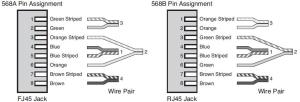
The Telecommunications Industry Association (TIA) and the Electronics Industry Association (EIA) have designed a wiring standard called 568A and 568B, which is used for the RJ-45 connectors on a UTP/STP cable. The number 568 refers to the order the wires within the Cat 5, Cat 3 and Cat 6 cables are terminated and attached to the connector. Both standards (568A and 568B) are the same in terms of the signal with a slight difference in the order the pins are terminated. They’re both used for patch cords in Ethernet networks. To be able to make these cables (in case you have to) you need to know which order to connect the wires to the connector. The following figure illustrates this, the pin numbers are read left to right while the connector tab facing down.

     Image taken from Mike Harwood’s Network+ Guide
Continue reading 4. Wiring Standards and Specialised Cable

Welcome


By clicking on the networking menu above you’ll find a page that aims at providing tutorials on various networking topics. At the moment I’m trying to provide tutorials that help those preparing for any of the certifications such as CompTIA Network + to reinforce the materials they’ve studied. The topics I’m planning to discuss are as follows:

  1. Network +
  2. Security +
  3. CCNA Networking
  4. CCNA Security

After finishing with these I’ll then focus on the main topic of the site, which is Information Security and can be tracked from this home page (front main page of the site). Some of the topics I’m planning on discussing here are:

  1. Information Security principles (cryptography)
  2. Network Security
  3. Systems Security
  4. Applications Security
  5. Intrusion Detection
  6. PenTesting

So please be patient with me as amongst other things (looking for employment, family life, etc) it took me a while to get familiar with the interface to set this site up because it is my first site or blog.

Regards

infosectutorials

2. Media and Connectors


Administrators must have solid knowledge of the logical standards and the physical media used on today’s networks.

Logical standards define the characteristics such as the configuration of the network, the speed at which they operate and how devices access the network.

Physical media refers to the cabling and connectors used to create the network.

The above two define and dictate the maximum distance between devices, the capability of media to withstand outside interference and even how much space is required in wiring closets and equipment cabinets. Choosing the correct media is very important because they form the foundation for the entire network.

When working with any media, you must be aware of the factors that influence its suitability for a given network implementation.

Interference, transmission speed, media length and installation and repair are some of the most common factors that affect media.

Media Interference (EMI) – common sources of EMI (electromagnetic Interference) are:

  • Computer Monitors.
  • Fluorescent light fixtures.
  • Basically anything that creates an electromagnetic field.

Continue reading 2. Media and Connectors

1. Introduction to Computer Networks


A network can be any connected devices. It can be as small as two computers or as complex as a multisite network such as a telecommunications infrastructure that contains 100s if not 1000s of computers that are connected together.

The common uses of a network are:

  • Communication video conferencing, email, chats, learning, etc…
  • Sharing Hardware – printers, scanners, storage…
  • Sharing data – files.
  • Sharing applications – Microsoft word, spread sheet, specialised software, etc.
  • Data Backup and retrieval

1.1     Types of Networks

1.1.1     LANs and WANs

They types of network used are dictated by the number of locations they span.

LANs – Local Area Networks are restricted to a single location (building, office, school).

WANs – Wide Area Networks spread over multiple geographic locations. They are slower than LANs and more expensive and they tend to use different technologies to connect LANs together to create an internetwork.

Continue reading 1. Introduction to Computer Networks

Introduction


Information systems have become very important in every business not only that, today you can hardly find a business, organisation or even home businesses that doesn’t have a computer network of some sort. These businesses have become very dependent on these systems for their daily day-to-day operations. Thus the effectiveness of organisation’s business performance has become greatly dependant on the availability, reliability and security of these computers and the networks they’re connected to.

Continue reading Introduction